
 EN
EN
 ES
ES
 PT
PT
 NL
NL
 AR
AR
 HR
HR
 CS
CS
 DA
DA
 FI
FI
 FR
FR
 DE
DE
 EL
EL
 IT
IT
 JA
JA
 KO
KO
 NO
NO
 PL
PL
 RO
RO
 RU
RU
 SV
SV
 TL
TL
 IW
IW
 ID
ID
 LT
LT
 SR
SR
 SK
SK
 SL
SL
 UK
UK
 VI
VI
 ET
ET
 HU
HU
 MT
MT
 TH
TH
 TR
TR
 FA
FA
 GA
GA
 BE
BE
 IS
IS
 LB
LB
 BG
BG

/images/share.png)
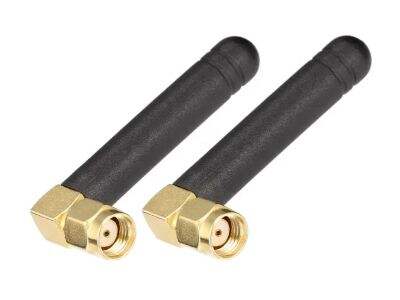
WiFi antennas play an important part in how we connect to the internet daily. When using a phone, tablet, or computer, you depend on WiFi antennas to send and get data fast. The better these antennas, the quicker and more steady your connection will be. This matters a lot for things like streaming videos or playing online games. At Signal, we know how key strong and efficient WiFi antennas are. Our antennas help you get top performance from your internet connection.
What to Look for in Good WiFi Antennas for Best Performance
When picking a WiFi antenna, there are a few things to consider. First, the antenna's gain matters. Gain measures how good the antenna sends and receives signals. A higher gain number usually means better results. For instance, antennas with 5 dBi or more can give a strong signal over long distances. Next, check the type of antenna. There are two main types: omnidirectional and directional. Omnidirectional antennas send signals all around, good for covering big areas. Directional antennas focus the signal in one way, useful if connecting to a far router. Also, think about frequency bands. Most new WiFi devices use 2.4 GHz and 5 GHz bands. Antennas that support both can offer more options and faster speeds. Finally, look at build quality. A solid antenna lasts longer and works better, even in various weather. At Signal, our antennas meet these standards. We want you to have fast and steady internet.
How WiFi Antennas Fix Common Data Sending Problems
WiFi antennas are made to solve many usual issues that slow your internet. One problem is interference from other gadgets. Like microwaves and Bluetooth devices can mess signals. High-quality antennas filter this out, so connections stay clear. This lets you do video calls without breaks or buffering. Another issue is distance. Farther from the router, the signal gets weaker. Signal antennas extend the range, so you stay connected in big homes or offices. You might hit obstacles like walls that block signals. A good WiFi Antenna helps get past these, making sure the signal reaches every spot. In addition, some antennas adjust direction automatically to find the best path. This smart tech keeps the connection strong, even when moving. At Signal, we commit to making antennas that handle these challenges, for smooth and quick internet.
How to Pick the Right WiFi Antenna for Your Fast Internet Needs
Picking the right WiFi antenna is key if you want fast internet at home or office. First, think about space size. In a small apartment, a simple antenna might do fine. But for a big house, you need a powerful one to send signals far. Another thing is the number of devices. If many devices like phones and computers, the antenna must handle lots of connections. Look for dual-band or tri-band antennas. These work on different frequencies, helping manage more devices without slowing down.
So, consider antenna type. Two main types: omnidirectional and directional. Omnidirectional sends signals everywhere, great for home use. Directional focuses the signal one way, stronger for long distances. If you know where WiFi goes, directional might be best. Also, check gain rating. Higher gain means better sending and receiving, especially for far places.
Before buying, read reviews from others. This helps see if it fits your needs. Lastly, think about brand. Signal makes reliable exterior wifi antenna that boost WiFi. Always check if compatible with your router. Follow these, and you can choose an antenna that supports high-speed data and keeps internet smooth.
Common Problems with WiFi Antennas and Fixes
Even the best WiFi antennas, you might face some issues. One usual problem is weak signals in parts of the home. If internet is slow in rooms, maybe walls or furniture block it. To fix, move antenna to another spot. Sometimes, just changing location makes a big difference. You can raise it higher too, because signals travel better up there.
Another problem is interference from electronics. Microwaves, cordless phones, Bluetooth can disrupt WiFi. If you think that's it, keep outdoor wifi antenna away from them. Or change WiFi channel on router for a clearer path. Most routers let you switch channels easily.
Last, update software on router and antenna. Companies like Signal release updates that improve performance and fix bugs. Check the website and install. Knowing these issues and how to solve them, you get better WiFi at home or work.
Benefits of Upgrading WiFi Antenna for Better Performance
Upgrading WiFi antenna can bring lots of good things, making internet much nicer. One big plus is faster speeds. Newer antennas, like from Signal, handle more data and give strong signals. So you stream videos, game, browse without lag. When upgraded, connection becomes more stable too. Good antenna cuts down drops, great for calls and meetings.
With this, range increases. A better antenna lets signal go farther, so you use devices anywhere in home or office. Useful for large areas. You won't need to stay near router. Enjoy shows or work from any spot.
Moreover, it supports more devices at once. For smart homes with gadgets, new antenna manages load well. Multiple connections without slow speed. Last, upgrade can boost security. New models have better encryption, harder for outsiders. In short, faster speeds, better range, more devices, improved security make upgrading a smart move for better internet.
